See what's really on your drive.
A disk analyzer, cleanup tool, file recovery tool, and personal cloud disk for Windows. Scan a full drive in seconds, find what's eating your space, reclaim it safely, and get back what you deleted.
$29 once. No subscription. Free updates forever.
Windows 10/11 · 64-bit · works fully offline
- Disk analyzertreemap + largest items
- Safe cleanupcaches, temp files, duplicates
- File recoverydeleted files from USB and SD cards
- P2P transferstraight from PC to PC
- Cloud diskdrag, drop, share with a code
See exactly what fills your drive.
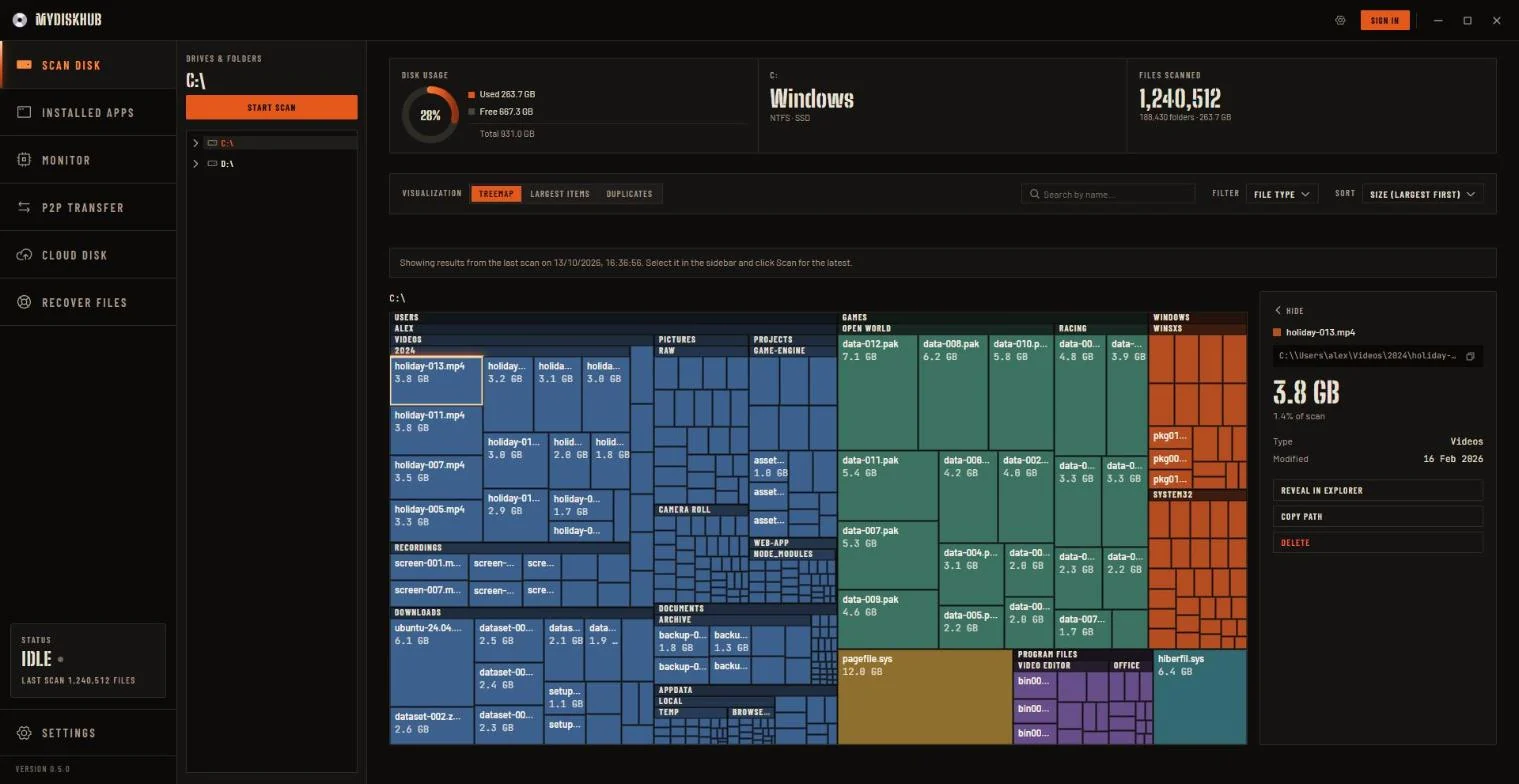
Scan a whole drive or one folder in seconds. Everything is drawn as a treemap: the bigger the block, the more space it takes. Click any block to dig into it.
- Color-coded by file type
- Largest files and folders, sorted for you
- Search everything you've scanned
- Last scan reloads instantly
Delete the copies, keep the original.
MyDiskHub compares what's inside your files, not just their names, so it only matches true copies. Then it keeps the newest one and clears the rest in a click.
- Matches by content, byte for byte
- Finds copies in any folder
- Keep the newest, trash the rest
Clear the junk without the worry.
MyDiskHub finds the files that are safe to clear: temp files, browser caches, old build folders. You see every item before anything moves, and nothing is ever permanently deleted.
- Temp files, caches, node_modules, .git objects
- You review and confirm every item
- Everything goes to the Recycle Bin
Find the apps you forgot about.
Every desktop and Microsoft Store app in one list, with its size and when you last opened it. Spot the big ones you never use and uninstall them right there.
- Desktop and Store apps together
- Size on disk and last used
- Uninstall without digging through Settings
Deleted it by mistake? Get it back.
Recover photos, videos, and documents from USB sticks, SD cards, and external drives. MyDiskHub copies the drive to an image first and works only on that copy, so the original is never written to.
- FAT, exFAT, and NTFS drives
- Folders lost to a quick format
- Files found by their content when the file system is gone
- Recovered files saved to a different drive
Windows asks for admin permission once to read the drive. The Windows system drive isn't supported.
Send a file straight to another PC.
Share a short one-time code, and the two PCs connect directly. Your file goes from one to the other without ever being stored on a server.
- Paired with a one-time code
- Live progress, speed, and time left
- Nothing staged in the cloud
Needs a free account. One transfer per rolling 24 hours.
A small cloud disk for files on the go.
Drag and drop files or whole folders into your personal cloud disk. Share anything with a code that expires, and the person receiving it doesn't need an account.
- Drag and drop files or folders
- Share with a code
- Links expire when you choose
Needs a free account.
Three minutes from install to reclaimed space.
Pick a drive or folder
Point it at C:\, a single project folder, or a whole external drive. Nothing leaves your machine to do this.
Watch it scan, live
A parallel recursive walk streams progress back in real time. Full drives typically finish in seconds, not minutes.
Clean what's actually safe
Review flagged temp files, caches, and duplicates before anything moves. Every delete lands in the Recycle Bin.
Pay once. No subscription.
So much software is rented by the month now. MyDiskHub isn't. Buy it once and every tool in the app is yours, with no subscription, no renewal, and no monthly fee. Every future update is included free.
$29 for the first 300 customers, then $49.
- 01$29First 300 customers
- 02$49After that
34 bought so far · 266 left at $29
One-time
USD · no subscription
- Scan, treemap, largest items
- Duplicate finder and safe cleanup
- Installed apps manager
- File recovery from USB, SD cards, external drives
- P2P file transfer, no daily cap
- Cloud disk, 1GB
- All future updates, free
One-time payment · no subscription · Windows 10/11 · 64-bit
Local-first
Scanning, cleanup, and the treemap run entirely on your machine. No account needed for any of it.
Signaling only
File transfer uses Supabase Realtime purely to exchange WebRTC connection info, never file content.
Recycle Bin, always
Every delete, everywhere in the app, goes to the Recycle Bin. There is no permanent-delete shortcut.
Questions, answered.
What do I get for $29?
A one-time license for MyDiskHub with every tool in the app: scanning, the treemap, cleanup, duplicates, the installed-apps manager, and file recovery, plus P2P file transfer and a small personal cloud disk. All future updates are included free.
Is it a subscription?
No. MyDiskHub costs $29 for the first 300 customers (then $49), paid once. There is no monthly or yearly fee, and every future update is free.
Do I need an account?
No. The app works completely without signing in, except for two features: sending files peer-to-peer and using your personal cloud disk. Everything else needs nothing but a download.
How much cloud storage do I get?
1 GB, enforced both client-side and by a database rule so it can't be bypassed.
Is P2P file transfer limited?
No. Send as many files as you like; there is no daily cap.
Can it recover deleted files?
Yes, from USB sticks, SD cards, and external drives formatted FAT, exFAT, or NTFS, including folders lost to a quick format and files found by their content when the file system is gone. MyDiskHub first copies the drive to an image (Windows asks for admin permission once), scans the copy, and saves recovered files to a different drive, so the original is never written to. The Windows system drive isn't supported.
Will it delete things permanently?
No. Every delete in MyDiskHub, including bulk cleanup actions, moves items to the Recycle Bin. You always get a confirmation screen first.
What platforms does it support?
Windows 10 and 11, 64-bit. It's built on Tauri with a native Rust scan engine, so it's a small, fast binary rather than an Electron app.
Still have a question? Write to hello@mydiskhub.com.
Find out what's actually on your drive.
$29, paid once. No subscription, and no account needed to start scanning.
Buy for Windows · $29Windows 10/11 - 64-bit